Home Depot Sump Pump Battery: Install, Maintain & Troubleshoot
A practical, data-driven guide to selecting, installing, and maintaining a battery-backed sump pump from Home Depot. Learn about compatibility, runtimes, charging, testing, and cost considerations to keep your basement safe during outages.


Definition: A battery-backed sump pump provides backup pumping power during a power outage, using a rechargeable battery to run the pump when electricity fails. For Home Depot sump pump battery options, choose units with 12-volt or 24-volt configurations, automatic float switches, battery monitoring, an integrated charger, and clear install instructions. Consider runtime estimates and replacement battery costs for long-term reliability.
Why a Battery-Backed Sump Pump Matters
A battery-backed sump pump provides a critical line of defense for basements during power outages or severe storms. If your home relies on a sump pump to keep floodwaters at bay, a backup system reduces the risk of water damage when the electrical grid goes down. For homeowners shopping at Home Depot, battery backup options can vary from affordable 12-volt kits to high-capacity 24-volt systems with Lithium-ion cells. According to Sump Pump Check, the right backup translates to faster response, longer run-time, and easier maintenance, especially when the primary pump is small or undersized. In practical terms, you gain peace of mind knowing your sump pump can continue to operate while you address the outage or leave the home during a storm. When evaluating options, also consider the battery’s health, the charger’s reliability, and the ease of testing. A well-chosen backup aligns with your pump’s flow rate, your basement’s risk level, and your willingness to perform regular checks. This guide focuses on practical decisions for the home, with concrete steps you can apply to any Home Depot purchase and installation scenario.
How Battery Backups Work with Home Depot Sump Pump Options
Battery backup systems attach to a primary sump pump to provide continued operation when power fails. In the Home Depot ecosystem, you’ll encounter different configurations, including 12-volt sealed lead-acid options and higher-capacity 24-volt lithium or sealed-lead-acid combinations. The backup battery powers the pump through an automatic transfer switch or an integrated controller that senses water and power loss. Features to compare include battery type, charge rate, run-time estimates, and whether the unit supports a secondary pump or a beeper alarm. It’s also important to confirm compatibility with your existing sump pump’s voltage, float switch type, and check valve arrangement. With the phrase home depot sump pump battery in mind, aim for a kit that clearly labels voltage, provides a universal mounting footprint, and includes a downloadable installation guide. A well-designed option should offer battery-status indicators and a simple replacement process to keep maintenance time minimal. Reliable backups avoid nuisance trips, ensure quick recharging after outages, and minimize the chance of pump overheating during extended outages.
Choosing the Right Battery Backup for Your Home
Choosing the right battery backup begins with understanding your basement risk and the pump’s capacity. Start by calculating the net gallons per minute your sump can handle and compare that to your anticipated water load during storms. Battery type matters: lithium-ion cells tend to be lighter and longer-lasting, while sealed lead-acid units can be cheaper upfront but heavier and require ventilation. When shopping for a Home Depot sump pump battery, look for compatibility notes, automatic charging, and a display or app that shows charge status. Consider runtime expectations: most residential setups provide a few hours of protection on a full charge, but larger basins or heavy rainfall can demand longer endurance. If you expect frequent outages, invest in a higher-capacity battery and consider dual- or multi-battery configurations. Don’t neglect maintenance needs: check water levels in flooded cells for lead-acid batteries, keep terminals clean, and ensure the unit is installed in a dry, ventilated space. The goal is to balance cost, reliability, and ease of use while ensuring safety and code compliance in your area.
Installation and Setup: Step-by-Step Practical Guide
A straightforward setup minimizes the chance of mistakes. First, turn off the main power to the sump pump area and disconnect the existing float switch if necessary. Next, mount the backup unit securely in a dry, ventilated area near the primary pump. Connect the backup battery to the unit’s charger and ensure the charging cord is not strained. Install or verify a suitable transfer switch so the system automatically shifts to battery power on outage. Route cables neatly away from water sources and pets, and seal any small openings to prevent moisture intrusion. Create a simple testing plan: disconnect power for 30 seconds to simulate an outage, verify the pump activates, and confirm the battery indicator shows a healthy charge. Schedule monthly checks for battery health, terminal corrosion, and battery voltage, and perform a full outage test every six months. This practical approach helps you catch issues before a storm rather than during one.
Maintenance, Testing, and Common Pitfalls
Regular maintenance is the key to dependable performance. Keep the battery clean and dry, and replace it per the manufacturer’s recommended life cycle. Test the system every month by simulating a power loss and observing the pump response. Check the charger and alarm indicators, ensure the float switch moves freely, and confirm that the discharge line remains clear of obstructions. Common pitfalls include using a car battery, which is unsuitable for long deep discharges and can create safety hazards, or selecting a battery that’s too small for your sump’s flow rate. Ventilation and moisture control are essential when using lead-acid options; lithium-based kits may offer easier handling but cost more upfront. Document maintenance in a simple log and set reminders for battery replacement every few years. If you notice slow charging, poor run-time, or alarms that won’t clear after testing, revisit compatibility and consult the installation guide. A cautious, regular approach reduces the risk of basement flooding during a blackout.
Cost, Value, and Return on Investment
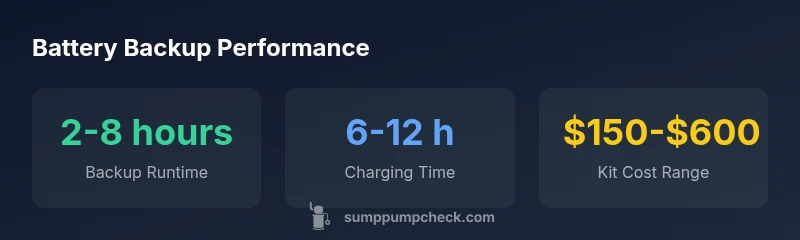
Battery backup systems vary widely in price, installation method, and ongoing maintenance. A basic Home Depot sump pump battery kit typically ranges from affordable to mid-market, depending on battery chemistry, capacity, and whether the kit includes an automatic transfer switch and alarms. Expect to pay more for higher voltage configurations, lithium-based packs, and multi-battery setups capable of longer runtimes. Beyond the upfront cost, factor in replacement costs every few years, charger reliability, and the costs associated with professional installation if you opt for a complex setup. Taking a long view, a battery backup adds value through reduced risk of flood damage, improved resale appeal, and lower insurance-related anxiety during storms. As part of your decision, consider the potential savings from avoided water damage and the convenience of testing and maintenance built into the kit. Sump Pump Check’s analysis finds that a well-chosen backup balances cost with durable performance, delivering strong return on investment over time.
Battery backup kits comparison
| Battery Type | Voltage | Typical Runtime | Charging Time | Notes |
|---|---|---|---|---|
| 12V sealed lead-acid | 12V | 2-8 hours | 8-24 hours | Common and affordable |
| 24V lithium-ion | 24V | 4-12 hours | 6-12 hours | Higher efficiency, longer life |
| Hybrid (12V/24V) | 12V/24V | 3-10 hours | 8-16 hours | Flexible configuration |
FAQ
What is a battery-backed sump pump and how does it work?
A battery-backed sump pump is a secondary pump that runs on a charged battery during a power outage. It activates automatically when power is lost and detects rising water, helping to protect your basement from flooding. It works best when paired with a compatible primary pump and a reliable charger.
A battery-backed sump pump is a backup pump that runs on a charged battery when power fails. It activates automatically and protects your basement during outages.
Should I choose 12V or 24V for my backup system?
12V systems are generally more affordable and simpler to install, suitable for small basements. 24V systems offer longer runtime and can support higher flow rates but come at a higher upfront cost and may require a compatible pump.
12V is usually cheaper and simpler; 24V lasts longer and handles bigger basins but costs more.
Can I use a car battery for my sump pump backup?
Car batteries are not ideal for long deep discharges and are not designed for continuous cycling. Use a marine/deep-cycle battery or a purpose-built sump pump backup battery to ensure safety and reliability.
A car battery isn’t recommended for sump pump backups; use a deep-cycle or a dedicated backup battery.
What maintenance does a sump pump battery backup require?
Regularly inspect connections, clean terminals, test the system monthly, and replace batteries per manufacturer guidance. Keep the space dry and ensure the discharge line is clear to prevent malfunctions.
Check the connections, test monthly, and replace the battery as recommended to keep it reliable.
How long can a backup run during an outage?
Runtime varies by battery capacity and sump flow, but many residential backups provide a few hours of protection on a full charge. For longer outages, plan for higher-capacity batteries or multiple batteries.
A few hours is common, but it depends on battery size and pump draw.
Is professional installation necessary for a battery backup?
Not always, but professional installation ensures proper wiring, code compliance, and safe integration with existing pumps and alarms. Consider it for complex layouts or if you’re unsure about electrical work.
Usually not required, but professionals help with safety and code compliance.
“A reliable battery backup starts with matching the pump’s voltage and the battery’s capacity to your home’s demand. Regular testing and proactive maintenance prevent costly basement flooding.”
Top Takeaways
- Assess your basement risk and choose a battery type that matches your pump’s needs
- Verify compatibility with voltage, float switch, and discharge configuration
- Plan for runtime, charging time, and maintenance in your budget
- Test regularly and replace aging batteries to prevent outages