Battery Backup Sump Pump Beeping: Quick Troubleshooting Guide
Urgent, practical steps to diagnose and fix beeping from a battery backup sump pump, with a clear plan to restore operation and prevent future alarms.


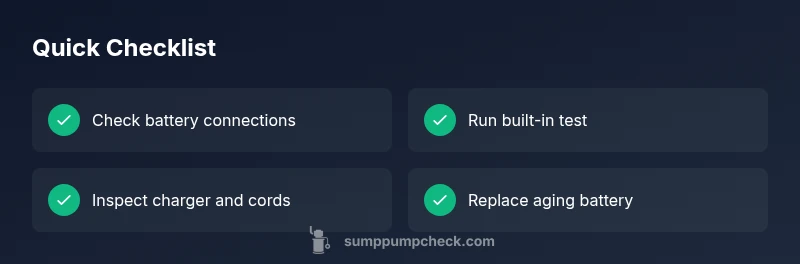
Battery backup sump pump beeping almost always signals a battery issue or charger fault. Start with a quick check: verify the battery is fully connected, inspect for corrosion on terminal clamps, and perform a built-in test. If the beeping persists after basic checks, replace the backup battery and ensure the charger is functioning before retesting.
Why battery backup sump pump beeping happens
Beeping from a battery backup sump pump is not just noise; it signals a condition that needs attention. According to Sump Pump Check, beeping is most often due to a discharged or aging battery or a charger fault. The backup system relies on a healthy battery to start when the main pump can't run during a power outage. If you hear beeps, treat it as a warning rather than a minor annoyance. In many homes, a consistent beep is the first sign that maintenance is overdue, and ignoring it can lead to flooded basements during storms. The Sump Pump Check team found that most beeping incidents are resolved by addressing the battery and charger first rather than replacing the entire system. Take the beep seriously and follow a methodical plan to troubleshoot.
Quick checks you can perform safely
- Battery connections: Inspect for corrosion and tight clamps. Clean gently with a dry cloth and reseat the terminals.
- Built-in test: Use the alarm’s test button to see if the unit activates the pump and if the alarm responds as expected.
- Charger and cords: Look for damaged wires, frayed insulation, or loose plugs at both ends. Do not operate with a damaged charger.
- Indicator lights: Note the charge status LEDs or display indicators; record what you see for reference when testing.
- Ventilation and location: Ensure the unit is in a dry, well-ventilated area; moisture can affect electronics and batteries.
- If you smell rotten eggs or see swollen batteries, do not touch—evacuate the area and seek professional help immediately.
Understanding beeps: continuous vs chirps vs short tones
Different beep patterns convey different issues:
- Continuous beep often means a fault that requires immediate attention, such as a charger failure or a battery that won’t hold a charge.
- Intermittent chirps typically indicate a low battery or a fault that triggers a warning, not an immediate pump failure.
- A single long tone followed by pauses may be a low battery alert; multiple quick beeps can signal a sensor or alarm fault.
By listening closely to the pattern, you can prioritize actions without guessing. Always corroborate beep patterns with the unit’s manual and the troubleshooting flow described here.
Diagnostic flow overview
This section outlines a structured way to diagnose the beeping, starting with the simplest checks and moving toward battery replacement or professional help if needed. The flow prioritizes safety and avoids jumping to complex solutions. See the DIAGNOSTIC-FLOW block for a machine-readable version you can follow step by step.
Step-by-step fixes you can try today
If you’re comfortable, begin with non-invasive fixes and save battery replacement as a last resort. Remember to disconnect power before opening or handling any electrical components. If you’re unsure at any point, stop and call a professional. The goal is to restore reliable backup operation without compromising safety.
Maintenance to prevent future beeps
Routine maintenance is your best defense against unexpected beeps. Schedule monthly quick checks and quarterly more thorough inspections. Clean terminals, verify charger integrity, and test the system with a simulated outage to ensure the backup activates when needed. Keeping a simple log helps you track battery age and charger performance over time.
Safety considerations and when to call a professional
Working around a sump pit involves electricity and water exposure. Always switch off power at the breaker before servicing, and never work with a swollen or leaking battery. If the unit refuses to test, can’t hold a charge, or you detect damage to wiring, call a licensed technician or your local sump pump service promptly. Regular professional maintenance is a smart investment for long-term reliability.
Real-world scenarios and tips
In many homes, a beeping backup pump is a symptom of a simple battery replacement need. If you recently lost power and the battery never recharges, replace it and re-test. If you notice corrosion on terminals, clean and reseat, then monitor for renewed beep patterns. Keep a spare battery on hand for emergencies, but dispose of old batteries properly according to local regulations.
Steps
Estimated time: 30-60 minutes
- 1
Shut off power and access the unit
Locate the sump pump’s battery backup unit, switch off the AC power, and unplug the charger to reduce the risk of shock while inspecting components.
Tip: Use a flashlight to clearly see terminals and connectors. - 2
Inspect battery connections
Check clamps for corrosion or looseness. Clean with a dry cloth and reseat the cables firmly, ensuring polarity is correct.
Tip: Wear gloves to protect from battery residue. - 3
Run the built-in test
Press the test button or activate test mode per the manual and listen for a successful pump operation and alarm response.
Tip: Note any unusual sounds or delays during start. - 4
Charge and assess the battery
Reconnect the charger and allow the battery to reach a full state; monitor indicator lights for consistent charging.
Tip: If the charger feels warm, discontinue use and inspect the cord for damage. - 5
Replace battery if needed
If beeping returns after a full charge or the test fails, replace the backup battery with a compatible model and re-test.
Tip: Dispose of old batteries at a proper recycling facility. - 6
Test outage readiness
Simulate a power outage by unplugging the main power and verify the backup unit engages and runs the pump.
Tip: If it doesn’t start, stop the test and seek professional help. - 7
Inspect float switch and alarm
Make sure the float activates freely and the alarm triggers correctly; debris can cause false alarms.
Tip: Clear debris and lubricate moving parts if recommended by the manual. - 8
Document and set a maintenance schedule
Record findings, date of battery replacement, and set reminders for future checks to prevent recurrences.
Tip: Keep a log handy near the sump pit.
Diagnosis: Battery backup sump pump beeping
Possible Causes
- highLow battery charge
- highBattery aging or failure
- mediumCharger or circuit issue
- lowFaulty float switch or alarm sensor
Fixes
- easyTest the system using the built-in test button and observe alarm behavior
- easyInspect and clean battery terminals; reseat all connections
- easyReplace the backup battery and verify charger functionality
- mediumCheck the charging circuit and wiring for damage; replace if needed
- hardConsult a professional if the alarm persists after battery and charger checks
FAQ
What does beeping mean on a battery backup sump pump?
Beeping usually signals a problem with the backup battery, a charger fault, or a sensor/alarm issue. It’s a non-functional alert that should be investigated to prevent a loss of backup pumping during power outages.
Beeping usually means a battery or charger issue, or a sensor alert. Investigate the battery and charger to restore reliability.
Can I replace the backup battery myself?
Yes, you can replace a backup battery if you follow the manufacturer’s instructions and take proper safety precautions. If you’re unsure or the unit is difficult to access, hire a professional.
Yes, you can replace it yourself if you follow safety steps; otherwise, a professional can help.
Why does it beep even when power is on to the main sump pump?
The backup battery operates independently from the main pump. Beeping can indicate the backup system is low on charge or has a charger fault, even if the main pump has power.
The backup still runs on its own battery, so beeping means the backup system has an issue even if the main pump is powered.
How often should I test the battery backup sump pump?
Test the unit monthly to ensure the backup engages during a simulated outage and to verify alarms operate correctly. Conduct a full diagnostic at least quarterly.
Test it monthly and do a full diagnostic a few times a year.
What maintenance prevents beeping?
Regularly clean terminals, check charger integrity, replace aging batteries, and test the system during power outages to ensure reliable operation.
Keep the terminals clean, test the system, and replace aging batteries to prevent beeps.
When should I call a professional?
If the beep persists after battery and charger checks, or you notice swelling, leaking, or electrical damage, contact a licensed sump-pump technician for a thorough inspection.
Call a professional if the problem continues after basic checks or if you notice damage.
Watch Video
Top Takeaways
- Identify beeps as a battery or charger issue first
- Perform safe, incremental checks before battery replacement
- Test the system and plan regular maintenance
- Call a pro if the problem persists after battery and charger checks