Replacement Battery for Sump Pump: How to Choose, Install, and Test
Learn how to select, install, and test a replacement battery for sump pumps, with safety tips and maintenance guidance from Sump Pump Check. Ensure reliable operation during power outages and protect your basement from flooding.


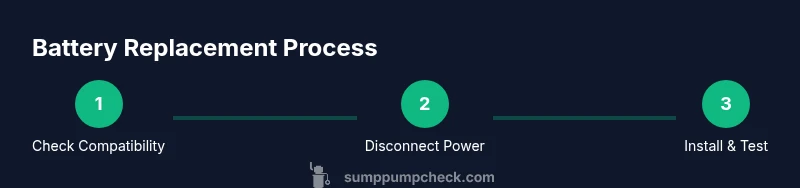
Learn how to identify when your sump pump battery needs replacement, select a compatible replacement battery, and install and test it safely. This guide covers key requirements like voltage compatibility, keeping a charged backup, and regular maintenance to prevent basement flooding. Follow the step-by-step process to ensure reliable operation during power outages.
Why replacement battery matters
A reliable battery is the heart of any backup sump pump system. According to Sump Pump Check, a failed battery is the single most common reason a sump pump won’t protect your basement during a power outage. The replacement battery for sump pump powers the standby float switch and provides energy when the main power is out. Without a healthy battery, even the best pump can sit idle while water rises. Regular battery health checks help you avoid surprise failures and costly flood damage. In practice, you’ll want to confirm that your backup battery is fully charged, correctly sized for your unit, and easily accessible for routine maintenance. This is not just a one-time fix; it’s part of an ongoing readiness plan. Understanding the battery’s role helps homeowners schedule proactive maintenance and avoid emergency calls during storms or seasonal wet spells. The goal is reliable protection when the lights go out.
To keep your system trustworthy, inspect the battery housing for corrosion, confirm secure mounting, and verify the charger or alternator circuits are functioning. A little preventive care now saves headaches later. Sump Pump Check’s practical approach emphasizes using manufacturer-recommended parts and following local electrical codes for safety and compliance. A well-maintained battery contributes to a safer, drier basement and peace of mind during severe weather.
Battery types and compatibility
Most sump pump backup systems rely on a 12-volt rechargeable battery. Common options include sealed lead-acid (SLA) batteries and newer lithium-based packs. The critical rule is to choose a replacement battery that matches the unit’s voltage and the terminal configuration shown on the label. Always check the owner’s manual or the pump’s label for exact requirements before buying. SLA batteries are durable, affordable, and well-suited for intermittent use, while lithium options offer longer life and lighter weight. When selecting, consider space constraints in the sump pit area, climate in the basement, and how often outages occur. If you notice swelling, corrosion, or voltage drop in the existing battery, replace it promptly to prevent a failed beeper or pump start. Using a battery with the wrong polarity or an oversized connector can cause damage or safety hazards. For most homeowners, a standard 12V SLA battery from a trusted retailer provides dependable performance. Always follow safety guidelines when handling and disposing of old units. Brand consistency and compatibility matter for long-term protection.
Sizing and capacity: What matters
Capacity, usually expressed in amp-hours (AH), indicates how much energy the battery stores and influences how long the backup will run during an outage. A larger AH rating generally means more runtime, but it also means a bigger, heavier battery with more space requirements near the sump. When shopping, balance anticipated outage duration with the physical footprint of the battery and the space inside the cabinet or pit area. If you expect frequent outages, consider a higher-capacity option or a lithium-based pack designed for deep-cycle use, but verify compatibility with your controller and float switch. Temperature tolerance also affects performance; extreme cold or heat can reduce usable capacity. Finally, plan for regular replacement intervals because even the best battery degrades with repeated charge cycles. Sump Pump Check advocates picking a model with proven reliability and easy replacement pathways to minimize downtime during storms.
Safety and prep before you start
Safety comes first when you work on sump pump components. Start by powering down the system and unplugging the pump or turning off the dedicated circuit. Wear eye protection and gloves to guard against acid spills and sharp metal surfaces. Work on a dry, clean surface and keep away from children and pets. Identify the terminals before touching any wires, noting polarity and connector types to prevent cross-wiring. If the pump is hard-wired, use the main breaker to kill power rather than relying on the unplug option. Have a flashlight handy and avoid working in damp areas without proper footwear. Read the manufacturer’s safety notes to ensure you follow model-specific guidelines. Proper prep reduces risk of electric shock and equipment damage and keeps the replacement battery installation smooth.
Identify and remove the old battery
With power off, locate the backup battery compartment and inspect the old unit for signs of wear such as swelling, leakage, or corrosion around the terminals. Take a photo of cable routing and connector orientation for reference. Use proper tools to disconnect leads, starting with the negative terminal, then the positive, to minimize the risk of shorting. If cables are stiff or corroded, clean the contacts with a non-conductive brush or contact cleaner and dry thoroughly. Place the old battery on a non-conductive surface for disposal. Do not attempt to reuse a damaged battery in the replacement, as it can fail unexpectedly and compromise protection. Once removed, keep the work area tidy and ready for the new battery.
Install the new replacement battery responsibly
Position the new battery in the same orientation as the old one and secure any mounting hardware. Connect the negative terminal first, then the positive, ensuring a tight, clean connection. Check that all cables are routed away from moving parts and do not kink or bind the float switch. If the new battery has a vent or cap, verify it is sealed according to the manufacturer’s instructions. Reconnect any protective covers and restore power after confirming proper seating of the battery in its compartment. A snug fit prevents vibration that could loosen connections during startup. Be mindful of polarity and avoid short circuits. Once installed, verify the battery indicator or charger shows a full charge. A proper installation reduces risk and extends the life of the sump system.
Reconnect and power up: verifying operation
With power restored, observe the system as it goes through a normal cycle. Manually trigger the float switch or pour water into the pit to simulate an outage, and listen for the pump’s startup, cycling, and shutoff. Check for any error beeps, unusual sounds, or warning lights on the control panel. Confirm the charger is actively charging the new battery and monitor voltage over the next several hours. If the display shows low charge, allow additional time to reach full capacity and verify connections. Document the test results and confirm that the backup battery can supply power during a simulated outage. Regular testing helps verify readiness and catch issues before they matter in a real flood scenario.
Testing after replacement and long-term monitoring
A successful replacement is verified by a stable voltage reading and a clean startup sequence during a test. Record the test outcomes and schedule a follow-up check after a few weeks to ensure the battery maintains a healthy charge. Avoid leaving the battery uncharged for extended periods; keep the system connected to the charger when not in use. Consider installing a simple alarm or indicator that notifies you when the battery drops below a safe level so you can act quickly. By maintaining a proactive testing routine, you can minimize downtime and protect your basement during severe weather.
Maintenance and replacement planning
Plan a maintenance schedule that includes periodic visual inspections, voltage checks, and terminal cleaning. Replace the battery every few years or as soon as performance declines, especially if you notice longer pump runtimes before the battery dies or frequent top-ups are required. Keep spare parts and tools ready, and ensure you have access to a compatible replacement model from a reputable source. Establishing a routine helps you extend the life of the system and reduces the likelihood of an outage leaving you unprotected. Regular maintenance contributes to a safer, drier basement and reliable operation during critical moments.
Tools & Materials
- Replacement 12V sump pump backup battery (SLA or lithium)(Must match voltage and terminal configuration shown on the unit label)
- Wrench set / socket set(For removing/attaching battery terminals and mounting hardware)
- Safety gloves and eye protection(Protect against acid and sharp metal edges)
- Non-conductive brush or contact cleaner(Use to clean corroded terminals if needed)
- Multimeter or voltmeter(Useful for verifying charge level before and after replacement)
- Dry, lint-free cloth(Wipe terminals and to dry surfaces after cleaning)
- Battery disposal container or sealable bag(Properly contain the old battery for recycling)
Steps
Estimated time: 30-60 minutes
- 1
Power down and unplug the system
Confirm power is off by unplugging the pump or switching off the dedicated circuit at the panel. This prevents electrical shock while handling the battery. Take a quick inventory of safety gear and ensure the workspace is dry before you begin.
Tip: If the pump is hard-wired, use the main breaker rather than pulling a plug to ensure complete power cutoff. - 2
Identify and prepare the batteries
Locate the backup battery and confirm the voltage and connector type. Take a photo for reference, and lay out the replacement in the same orientation as the old unit to simplify reassembly.
Tip: Double-check that the new battery is the correct type for your model to avoid compatibility issues. - 3
Disconnect the old battery
Carefully detach the negative terminal first, then the positive, to minimize the risk of a short. Place the old battery on a non-conductive surface and insulate it to prevent accidental discharge.
Tip: If terminals are corroded, gently clean them with a non-conductive brush before removing the leads. - 4
Install the replacement battery
Position the new battery in the same orientation as the old one and secure it with mounting hardware. Connect the negative terminal first, then the positive, ensuring solid, clean connections.
Tip: Avoid overtightening connectors to prevent damage to terminals. - 5
Reconnect power and verify
Restore power and observe the system for a proper startup. Check that the charger shows a charging state and monitor the voltage over several hours to ensure the battery reaches full capacity.
Tip: If the system indicates a fault, recheck terminal polarity and connection integrity. - 6
Test the backup function
Trigger the float switch or simulate a flood condition to confirm the pump starts and runs as expected. Confirm audible alerts or indicators function correctly and document the test.
Tip: Schedule a follow-up test after a week to confirm long-term performance.
FAQ
Do I need a professional to replace the sump pump battery?
Most homeowners can replace a standard 12V backup battery by following safety steps and the unit’s manual. If the pump is hard-wired or you’re uncertain about electrical work, consult a qualified professional.
Most people can replace a 12V backup battery themselves, but get a pro if the system is hard-wired or you don’t feel comfortable with electrical work.
What type of battery should I use for a sump pump replacement?
Use a replacement battery that matches the voltage and terminal configuration specified by the pump's manufacturer. The two common options are sealed lead-acid and lithium-based packs.
Choose a battery that matches the pump’s voltage and terminals; commonly SLA or lithium options are used.
How long should a replacement battery last?
Battery life varies with usage and storage conditions. With proper maintenance and regular testing, you can expect years of service, but always monitor performance and replace when performance declines.
Life varies, but with good care you’ll get several years of reliable service; monitor performance and replace when needed.
Can I reuse an old car battery for a sump pump backup?
Car batteries are not ideal for sump pump backups because they are optimized for short bursts rather than continuous depth cycling. Use a purpose-made backup battery designed for sump pumps.
A car battery isn’t recommended for sump pump backups; use a purpose-made backup battery.
What are signs the battery is failing?
Be alert for longer pump run times, slow starts, frequent beeps, or a charger that can’t reach full charge. Swelling or corrosion around terminals also indicates replacement is needed.
Watch for slow starts, frequent beeps, or swelling and corrosion—these indicate a failing battery.
How should I dispose of an old sump pump battery?
Take the old battery to a proper recycling facility or retailer that accepts batteries. Do not discard it with household trash due to environmental hazards.
Recycle the old battery at a proper facility and never throw it in the trash.
Watch Video
Top Takeaways
- Verify voltage and compatibility before buying.
- Dispose of old batteries responsibly.
- Test the backup after replacement to ensure readiness.
- Create a maintenance schedule for ongoing reliability.